
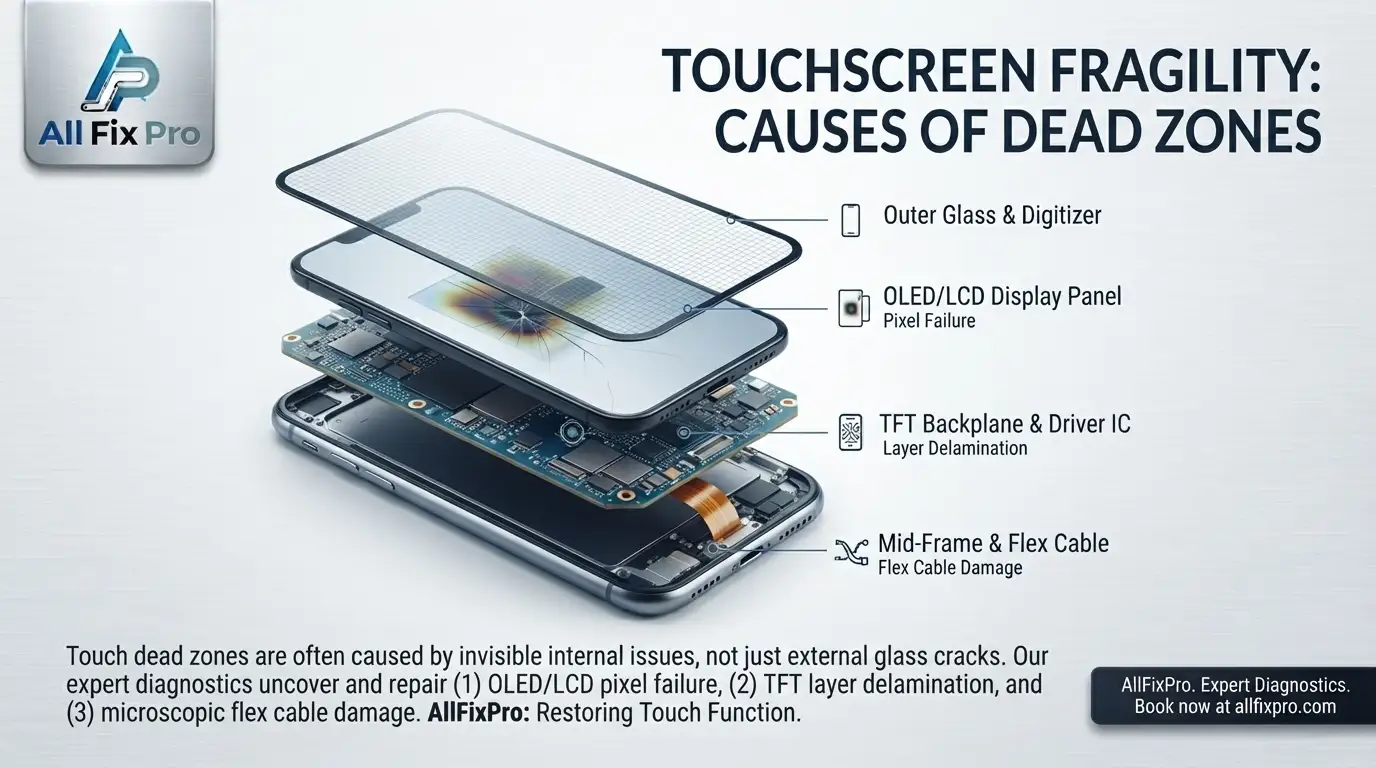
A smartphone touchscreen should respond consistently when you tap, swipe, or type. But sometimes one section of the screen stops detecting your finger while the rest continues working. These areas are commonly called smartphone touchscreen dead zones.
A dead zone can make typing difficult, prevent you from selecting buttons, or stop you from using certain parts of an app. The problem may develop after a phone is dropped, exposed to pressure, or affected by a hardware or software fault.
What Is a Touchscreen Dead Zone?
A touchscreen dead zone is an area of the display where touch input is not detected correctly. For example, the top of the screen may respond normally while a strip near the bottom does not register taps.
Some dead zones affect a small section, while others cover a larger part of the display. The problem may remain constant or appear intermittently.
The display can still show images in the affected area because producing an image and detecting touch are different functions. This is why a phone may look normal even when part of its touchscreen is not working.
Common Phone Screen Dead Zone Causes
There are several possible phone screen dead zone causes. Physical impact is one common possibility. A fall can affect the touch-sensitive components or the internal connection between the screen and the phone.
Pressure or bending may also damage the display assembly. In other cases, moisture, a faulty screen protector, software problems, or a previous repair may contribute to inconsistent touch response.
The location of the unresponsive area can provide useful information, but it does not confirm the exact fault. A technician may need to test the screen and inspect its connections.
Why Are Certain Touchscreen Areas Unresponsive?
Touchscreen unresponsive areas may occur when the touch-sensing system cannot detect contact in a particular section. The phone may ignore taps, miss parts of a swipe, or respond only when you press repeatedly.
A damaged touch-sensitive component can cause this behavior. A loose connection or damaged display assembly may produce similar symptoms.
Start with simple checks. Clean the screen with a suitable soft cloth and make sure your fingers are dry. Remove gloves and check whether a thick, cracked, or poorly fitted screen protector is interfering with touch response.
What Are Screen Digitizer Dead Spots?
Screen digitizer dead spots are areas where the touch-sensitive system fails to register input accurately. The digitizer detects the position of your finger and communicates that information to the phone.
If a section of the digitizer is damaged, the display may continue showing content while touch response is missing in that area. Depending on the phone model, the touch technology may be integrated into the display assembly.
This is one reason repair methods differ between devices. Some models require a complete screen assembly, while others may have different component arrangements.
How to Test Smartphone Touch Response
You can test smartphone touch response with a few simple steps. First, open a drawing app or another app that allows you to move your finger across the screen. Slowly draw lines from one edge to another, covering the full display.
Watch for gaps where the line stops even though your finger remains in contact with the screen. You can also open the keyboard and tap keys in different areas to see whether certain positions consistently fail.
If your phone has a built-in diagnostic feature, you may use it according to the manufacturer’s instructions. Avoid installing unfamiliar apps that request unnecessary permissions.
Repeat the test after cleaning the screen and temporarily removing a problematic screen protector. If the same area remains unresponsive, the issue may be related to touchscreen hardware.
Can Software Cause a Dead Zone?
Yes. A temporary software issue, an unresponsive app, or a system problem may make touch input appear unreliable. Restarting the phone can help rule out some temporary problems.
Check whether the issue happens across the entire phone or only inside one app. If the touchscreen works normally elsewhere, the app itself may be responsible.
However, if the same physical section fails in different apps, a hardware issue becomes more likely. A factory reset should not be your first step. Back up your data and seek advice before taking actions that could erase information.
When Is Touchscreen Repair Necessary?
If a dead zone remains after basic checks, a technician should inspect the display assembly and touch system. This is especially important if the problem began after a drop, pressure, or moisture exposure.
A technician can test touch response across the screen, inspect the relevant connections, and determine whether the display assembly needs repair or replacement.
If certain touchscreen areas remain unresponsive, explore our phone repair services to understand your repair options. Before handing over your device, follow our guide on how to prepare your phone before a repair.
Frequently Asked Questions
1. Why does only one part of my phone screen stop working?
A damaged touch-sensitive component, display connection, screen protector, or software problem may affect only one area.
2. Can a phone touchscreen have dead zones without cracks?
Yes. Internal touch components can be affected even when the outer glass looks normal.
3. How do I know if my digitizer is damaged?
Repeatedly missed taps, unresponsive sections, and inaccurate touch input may indicate a digitizer problem. A technician can confirm it through testing.
4. Can restarting a phone fix touchscreen dead zones?
It may resolve a temporary software issue, but it will not repair physically damaged touchscreen components.
5. Can a screen protector cause touch problems?
Yes. A damaged, thick, or poorly fitted protector may interfere with touch response. Removing it temporarily can help with troubleshooting.
6. Should I press harder on a dead zone?
No. Extra pressure will not restore a damaged touch sensor and may make physical damage worse.
7. Does a dead touchscreen area require a full screen replacement?
Not always. The required repair depends on the phone’s design and the component responsible for the fault.
8. When should I take my phone for touchscreen repair?
Arrange an inspection if the same area remains unresponsive after basic checks or if the problem started following physical damage.